
How to design a transmission line speaker
Ask AI about this page
A transmission line puts the back of the woofer at one end of a long, folded duct and lets the bass come out of the other. Done well, it gives deep, controlled bass from a modest driver. Here's how to choose a line type, set its length and stuffing, and check it before you cut any wood.
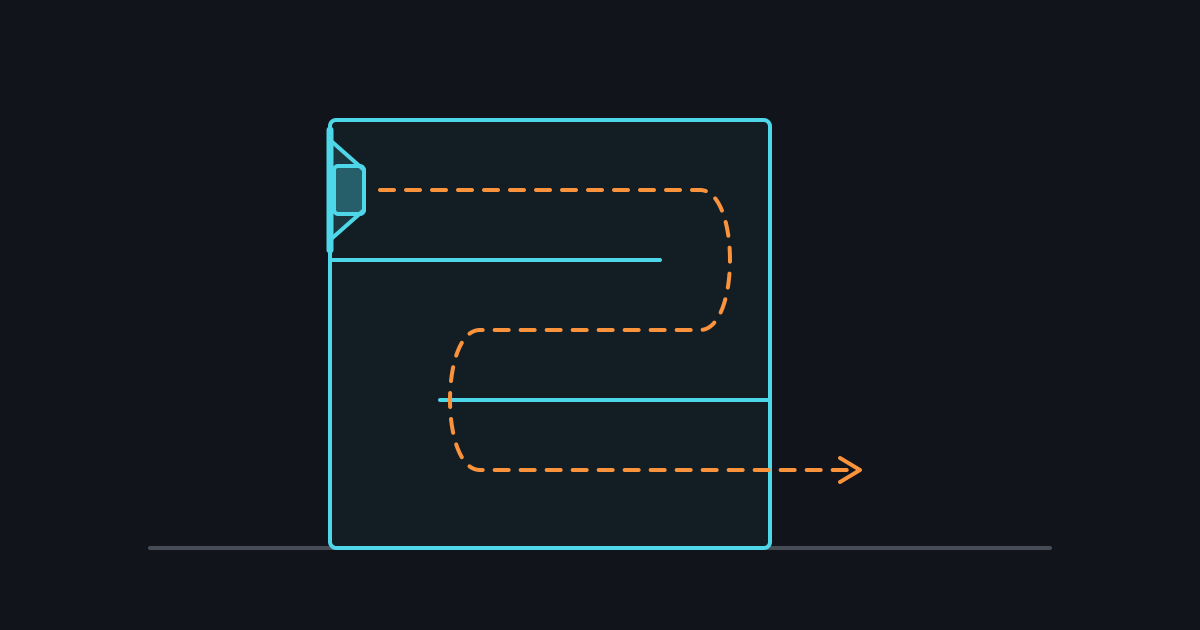
How a transmission line works
The sound from the back of the cone travels down the line and comes out of the mouth. Near the line's quarter-wave resonance, that sound arrives back in step with the front of the cone and adds to it, so the bass is reinforced, and the air in the line loads the cone, so it moves less there. Higher up, the line's other resonances would add peaks and dips, so the line is partly filled with stuffing (wool, polyester fibre) to soak them up.
So a line is a balance between three things: its length (which sets the tuning), its shape (how its area changes along the way), and its stuffing (which smooths the response but costs some bass).
The main types
| Type | What it is | Good for |
|---|---|---|
| Classic TL | Driver at the closed end, the line narrowing towards the mouth, stuffed for about two thirds | Compact lines with a well-damped response |
| TQWT (Voigt pipe) | A narrow closed end opening out to a wide mouth, driver about a third along, lightly stuffed | Full-range drivers in tall, slim cabinets |
| Offset TL | A straight line with the driver about a fifth of the way along | Deep bass with fewer ripples than a plain straight line |
| MLTL | A straight line with a port at the mouth, tuned like a ported box | The smallest, smoothest line |
| Tapped horn | The front of the driver feeds the line further along (an expanding horn) | Big, efficient subwoofers |
| Front horn | The driver at the throat of a horn | Efficiency in a narrow band |
The app has a starting point for each of these but the tapped horn: add a Transmission line design on the Boxes tab and press a preset, or press Compare types to see them all for your driver. The tapped horn's preset gave poor, very large designs, so it's off while it's reworked; set one up by hand (Type: tapped horn) or import it from Hornresp.
The worked example
The example uses a Dayton Audio DSA215-8, an 8″ woofer (Fs 35 Hz, Qts 0.33, Xmax 5.5 mm), at 25 W behind a 28 Hz high-pass filter. It's the same driver Speaker Box Genius was checked against Hornresp with. Compare types made and tuned each line; three of them:
| Classic TL | Offset TL | MLTL | |
|---|---|---|---|
| Line length | 170 cm | 225 cm | 86 cm |
| Volume | 37 L | 71 L | 24 L |
| Tuning | 35.1 Hz | 35.1 Hz | 40.0 Hz |
| F3 | 50.7 Hz | 34.2 Hz | 40.2 Hz |
| Ripple above F3 | 10.7 dB | 17.3 dB | 3.7 dB |
| Peak cone excursion | 3.0 mm | 4.4 mm | 5.1 mm |
| Enclosure | Peak |
|---|---|
| Classic TL | 3.0 dB@ 257 Hz |
| Offset TL | 6.0 dB@ 257 Hz |
| MLTL | 1.8 dB@ 190 Hz |
| Enclosure | Peak |
|---|---|
| Classic TL | 3.0 dB@ 257 Hz |
| Offset TL | 6.0 dB@ 257 Hz |
| MLTL | 1.8 dB@ 190 Hz |
The offset TL goes deepest but is the biggest box. The MLTL is smaller than even the classic TL, and much smoother, because its port does the low-frequency work and the line mostly needs to stay quiet. The MLTL guide takes this one further: its port, driver position and stuffing, and why a ported-box calculator gets a tall tower wrong. The classic TL, stuffed for two thirds of its length, is well damped but heavily stuffed lines give up bass.
Step 1: length sets the tuning
A line resonates first where it's a quarter of a wavelength long. For this driver's Fs of 35 Hz, that's about 245 cm. Real lines are shorter than that: a narrowing line and stuffing both lower the tuning, so the classic TL above tunes to 35.1 Hz in 170 cm.
There's no need to work this out by hand. Type the tuning you want and press Set line length (or Set port length for an MLTL): the app scales the line, the driver position and the stuffed section until the simulation tunes where you asked.
Step 2: stuffing smooths the response
The stuffing's job is to damp the line's higher resonances without killing the fundamental. For the offset TL in the example, stuffing the part behind the driver:
| Stuffing | F3 (no filter) | Ripple above F3 |
|---|---|---|
| None | 31.1 Hz | 38.7 dB |
| 3 kg/m³ | 31.4 Hz | 22.0 dB |
| 6 kg/m³ | 32.2 Hz | 17.3 dB |
| 10 kg/m³ | 33.8 Hz | 13.6 dB |
An empty line is a mess of peaks and dips. A little stuffing does most of the work; more keeps smoothing it, but costs bass. In the app, stuffing is set per section, in kg/m³ (light polyester fibre is around 4–8 kg/m³). Why fibre slows sound and makes air act springier is explained in the box stuffing guide. Best line searches the driver position and the stuffing for the smoothest response or the deepest bass, then retunes the length.
Step 3: look inside the line
Two views help you understand what a line is doing:
- Cone + mouth (the button on the response chart) splits the response into the sound from the front of the cone and from the mouth. You'll see the mouth take over around the tuning, and where the two cancel.
- Pressure and air speed inside, in the design's card: how the pressure and the moving air are spread along the line at any frequency you pick. Stuffing absorbs where the air moves. At the fundamental, the air barely moves near the closed end, so stuffing there damps the higher resonances while costing little bass. That's why lines are usually stuffed behind the driver and left open towards the mouth.
The Line load (Za) chart shows the line's acoustic impedance as Hornresp does, for checking against it.
Step 4: check the excursion and the mouth
Below its tuning a line stops holding the cone back, much like a ported box, so check the cone excursion at your real power with a high-pass filter in place. In the example, all three lines stay under the 5.5 mm Xmax at 25 W behind the 28 Hz filter.
For a mass-loaded line, the port has the same air-speed limit as any port (about 17 m/s before it chuffs). The MLTL preset sizes its port for your power: here, 7.3 cm across.
Step 5: fold it and build it
A 2 m line has to be folded to fit in a cabinet. Under Fold it into a box, set the line's inside width and the number of folds, and the app draws the side view: the runs, the dividers, the driver and the mouth. The Build tab turns it into a cut list, panel by panel. Remember that the panels and dividers take up room: the volume and the length are measured along the inside of the line.
Checklist
- Press Compare types to see which line type suits your driver and space.
- Set the tuning with Set line length (or Set port length for an MLTL).
- Stuff the line until the ripple is under control; use Best line to fine-tune.
- Check the cone excursion (and an MLTL's port speed) at your real power, with a high-pass filter.
- Fold it, check the side view, and print the cut list (Build → Export → PDF).