
A free online WinISD alternative
Ask AI about this page
WinISD has been the go-to free tool for designing speaker boxes for many years. Speaker Box Genius does the same job in your browser, on any computer or phone, and gives the same answers.
Open an example: one driver in three boxes →
Why another box simulator?
WinISD is excellent at what it does, and it's the reference this app is tested against. But it hasn't had a new release in years, it only runs on Windows, and a few things about it trip people up:
- Entering T/S parameters. Type them in the wrong order and the values it calculates can overwrite the ones you entered.
- Passive radiators. Comparing PRs, counts and added mass takes a lot of manual trial and error.
- Net volume. Working out the real inside volume after the drivers, PRs, ports and bracing usually means a separate spreadsheet.
- Sharing. Asking for help on a forum means posting screenshots of several windows, and whoever helps has to rebuild your design by hand.
Speaker Box Genius is built around those four problems.
What it does
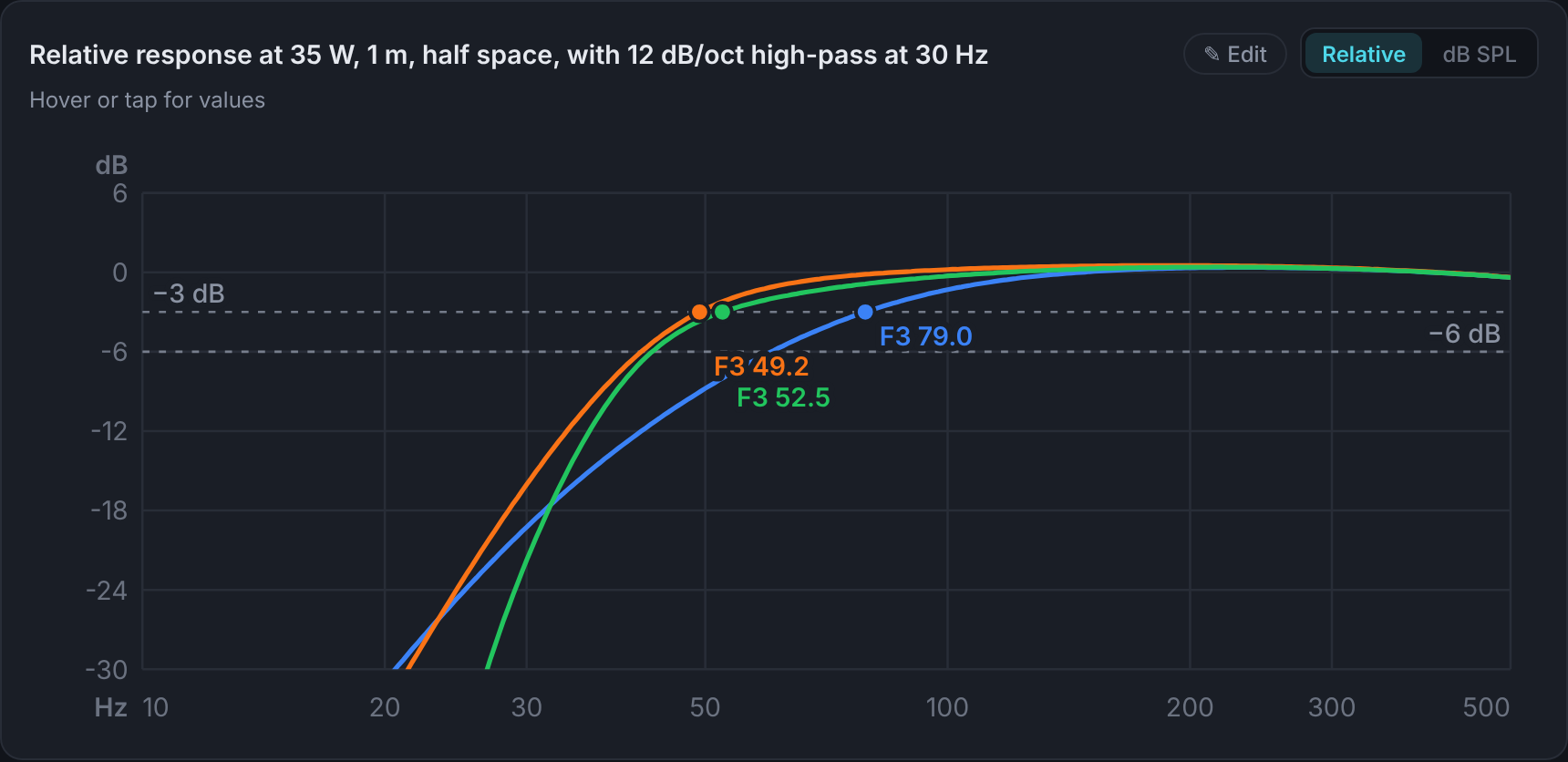
- Sealed, ported, passive radiator and 4th- and 6th-order bandpass boxes, up to eight side by side on the same charts.
- Transmission lines, tapped horns and front-loaded horns, which WinISD doesn't model (checked against Hornresp).
- Charts for everything you check before you build: response, cone excursion with an Xmax line, PR excursion, port air speed with a chuffing line, maximum SPL (and what limits it) with the amplifier voltage and current it takes, impedance and group delay.
- A T/S editor that never overwrites what you typed, and that reads parameters pasted straight from a datasheet. Change a database driver or passive radiator and a line says what was edited, with Reset to get the published values back.
- Alignment presets that give WinISD's boxes: QB3, BB4/SBB4 and C4/SC4 for ported and passive radiator boxes, and Qtc 0.5, 0.577 and 0.707 sealed, are sized the way WinISD's new-project wizard sizes them, checked against WinISD for 19 drivers (validation) and its closed-box wizard (sealed). The amplifier resistance defaults to WinISD's 0.1 Ω, and the WinISD preset in Settings (which opening a WinISD project sets) counts watts as WinISD does, so a box simulates as it does in WinISD. The textbook lossless alignments are a setting away.
- A database of about 2,070 drivers and 62 passive radiators, searchable, with links to each datasheet, and a page for every driver with suggested boxes to start from.
- Passive radiator tools: find the best PRs for your driver and box, the added mass for a tuning, and the best tuning for a PR you already have.
- A net volume calculator for boxes, car wedges, cylinders, spheres and tapered boxes, minus everything inside them (how it works for each shape), and a cut list for building the box.
- Live links: the whole design lives in the link, so whoever opens it sees exactly what you see and can change it. Share also makes a forum image and ready-to-paste Reddit and diyAudio posts.
- Compare drivers: draw a second driver in every box, dashed, to see which one suits it better.
- Baffle diffraction on a driver's curve: load a driver's .frd and save it with your baffle's diffraction for VituixCAD or XSim (Save & Export → Crossover tools, how); WinISD has no baffle step.
Side by side
| WinISD | Speaker Box Genius | |
|---|---|---|
| Runs on | Windows | Any browser: Windows, Mac, Linux, phones, tablets |
| Install | Download and install | None (and it works offline once opened) |
| Price | Free | Free (non-commercial licence) |
| Box types | Sealed, vented, bandpass, passive radiator | The same, plus transmission lines and horns |
| Driver data | Typed in, or files you find | Database of ~2,070 drivers, plus your own |
| Baffle step | Not modelled: the SPL is for an infinite baffle | Optional, with EQ or passive compensation (how it works) |
| Sharing a design | Screenshots or project files | A live link, a forum image and forum posts |
| Your WinISD files | Opens .wdr drivers and .wpr projects, and saves any box as a .wpr |
Does it give the same answers?
Yes. The app is checked against WinISD 0.7.0.950 using real WinISD project files: sealed, ported, passive radiator, both bandpass types, isobaric pairs, dual voice coil drivers, several drivers in parallel, high-pass filters and box losses. Besides the hand-picked cases, 51 projects written by the app and opened in WinISD were read at six frequencies each, about 1,000 values in all: the response agrees within about 0.01 dB for sealed, ported, passive radiator and bandpass boxes, and excursion, port speed and impedance within reading accuracy. Every comparison runs as an automated test whenever the code changes. Every case, value and known difference is on the validation page.
For like-for-like comparisons, set Air to WinISD defaults in Settings, and show port speed as peak (WinISD plots peak). Importing a .wpr project sets these for you.
Moving over from WinISD
- Bring your drivers and projects. On the Driver tab, open Edit T/S → ⋯ and choose WinISD or OpenISD file… (exporting a driver as
.wdris in Save & Export). A.wpr(or OpenISD.owpr) project brings its box and its settings too, including a port end correction you changed from WinISD's 0.732 (Settings → Simulation → Ports → End correction K). A file with values missing still opens: what was filled in is listed under the driver card (N values assumed), and a missing Xmax or Pe stays empty, with no redline, until you enter it. - Or pick a driver from the database. Press Browse drivers and search by brand, model or size.
- Add boxes on the Boxes tab, and choose a Preset (Qtc 0.707, QB3 and others) to size each one for the driver: they give the same box as WinISD's wizard.
- Share it: the Share button gives you the link, a forum image and posts ready to paste.
- Check it in WinISD if you like: Save & Export → WinISD project (☰ menu) saves a box as a
.wprproject with the driver and settings, and says what WinISD can't hold (EQ, passive parts, baffle step, room gain).
Questions
Is it really free?
Yes, for non-commercial use: no account, no sign-up, and nothing to pay. The code is on GitHub under the PolyForm Noncommercial licence (source-available, not open source).
Does it work offline?
Yes. Once the app has opened, it keeps working without a connection, and you can install it from the browser like an app on a computer or phone.
Can I open my WinISD drivers and projects?
Yes: .wdr drivers and .wpr projects open with their box and settings, and any box can be saved back as a .wpr for WinISD.
Does it model two passive radiators?
Yes: two or more passive radiators per box, with added mass, each radiator's excursion against its Xmax, and tools that find a PR and the added mass for a tuning.
Is it as accurate as WinISD?
It's tested against WinISD's own results: the response agrees within about 0.01 dB for sealed, ported, passive radiator and bandpass boxes. The cases are on the validation page.